











Wisprs for AI Productivity
- Free
- 4.91
- V1.0.0
AI transcription software with speaker recognition and 100+ languages
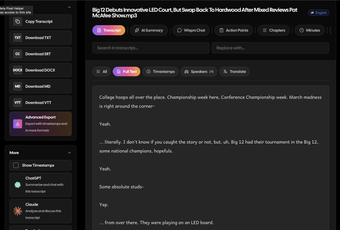
Wisprs is an AI transcription software for audio and video. It helps creators, teams, researchers, podcasters, and businesses turn recordings into editable transcripts, subtitles, summaries, chapters, and reusable notes. Upload a file such as a client call, interview, podcast episode, lecture, webinar, or voice memo, then review and export the transcript from your browser.
Key features
- Transcribe audio and video in 100+ languages, with language auto-detection or manual selection.
- Use speaker recognition for interviews, calls, meetings, and multi-person recordings.
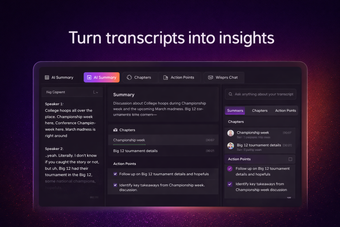
- Generate AI summaries, chapters, topics, and action items from a completed transcript.
- Chat with your transcript to find answers, quotes, decisions, and follow-up items faster.
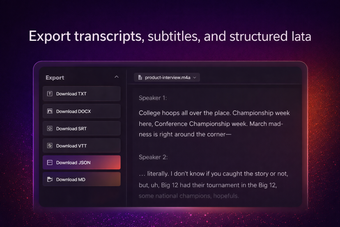
- Export transcripts and captions in TXT, SRT, VTT, MD, DOCX, or JSON, depending on plan.
- Work with common file formats including MP3, MP4, WAV, M4A, FLAC, AAC, OGG, and WEBM.
How it works
Upload an audio or video file, choose your transcription settings, and let Wisprs process the recording. Most files complete in under 5 minutes. Results are editable, so you can correct names, refine speaker labels, and prepare the transcript before exporting. Accuracy is excellent on clear audio, but quality varies by language, accent, background noise, and recording conditions.
System requirements and plan limits
Wisprs is a web app and works in modern browsers including Chrome, Safari, and Firefox. The free plan includes 30 minutes of transcription per day, no credit card required, with TXT and SRT exports for basic workflows. Paid plans start from $25/month and add higher limits plus features such as expanded export formats, speaker identification, AI summaries and chapters, batch workflows, and watermark-free exports.
What's new in this version
This Softonic listing introduces Wisprs as a browser-based AI speech-to-text app for transcription, subtitles, summaries, and content repurposing. Your data stays yours: Wisprs does not use customer files to train AI models.
Loading…
App specs
License
Free
Version
1.0.0
Latest update
Platform
Web Apps
OS
Chrome
Language
English
Developer
Wisprs for AI Productivity
- Free
- 4.91
- V1.0.0
User reviews about Wisprs
Have you tried Wisprs? Be the first to leave your opinion!
Add reviewTop downloads AI Productivity for Web Apps
Seventh Sight
Unravel Your Dreams with AI Insights

Cat Scanner – Cat Breed AI Identifier
Cat Identifier Online – AI Breed Scanner By Pictures
TodoVex
TodoVex: An AI-Driven Task Management Tool

MatchCV
Paste job description and MatchCV tailors your resume in 10 seconds — keyword gaps closed, ATS score checked, STAR bullets rewritten. Free AI resume tailor.
Taskbase
Streamline Your Tasks with Taskbase's AI Assistant
Top downloads AI Productivity for Web Apps
Top downloads AI Productivity for Web Apps
Related topics about Wisprs
Latest articles

Microsoft’s Xbox shake-up looms: Obsidian reportedly among studios in talks

Where to watch Spain vs Austria for free: La 1, RTVE Play, and all the legal options

Meta reportedly readies Meta Compute: a cloud rival to AWS and Azure

Ghost in the Shell remake announced as fully hand-drawn: no generative AI at all

World of Warcraft addons for 2026: best picks after Midnight’s shake-up
Laws concerning the use of this software vary from country to country. We do not encourage or condone the use of this program if it is in violation of these laws. Softonic may receive a referral fee if you click or buy any of the products featured here.